

Frequently Asked Questions
BOD Analyzer
General Information
YSI is discontinuing the 4010-2W and 4010-3W meters — is my BOD Pro system still supported?
Yes. BOD Pro™ runs on the YSI 4010-1W meter, which is not being discontinued, so your system remains fully supported. Both the Optical DO probe and the Membrane DO probe are still compatible with the 4010-1W and continue to work with BOD Pro™ — only the 4010-2W and 4010-3W meters are affected by YSI’s discontinuation. Multiple 4010-1W meters can be used for multi-probe configurations. View more details here.
How can the BOD Sample Transfer Systems be oriented/configured in the laboratory?
Since the sample transfer system is on a separate autosampler from the BOD system, the systems can be oriented side-by-side, back-to-back or as an L-shape. See top view example here:

Can MANTECH’s systems automate capping/uncapping bottles?
Yes, MANTECH has the option to to automate uncapping/capping of field bottles and BOD bottles.
Can MANTECH’s systems automate dechlorination?
Yes, MANTECH offers benchtop and autosampler options to automate residual chlorine detection and dechlorination according to Standard Methods.
Can MANTECH’s systems automate pH adjustment?
Yes, MANTECH offers benchtop and autosampler options to automate pH measurement and adjustment according to Standard Methods.
Can MANTECH’s system automate sample transfer from field to BOD bottles?
Yes, the option to automate sample transfer is available from MANTECH.
How do you calculate seed correction and BOD?
To learn how to calculate Seed Correction and BOD, please refer to this document. In BOD Pro, two separate values for Seed Correction Factor are stored along with the Run; one is referred to as BODSeedCorrection, and the other CBODSeedCorrection. The way we calculated BODSeedCorrection in BOD Pro is as follows: (1) Dividing the depletion of each BOD Seed bottle by its own volume (the seed volume), the resulting quantity is referred to as DepletionPerMLSeed (2) and then we average the DepletionPerMLSeed over all the BOD Seed bottles. CBOD Seed Correction was calculated by doing the same on CBOD Seed bottles. The software allows for only one Seed ID to be included in the Run. There can be any number of BOD or CBOD Seed bottles within that Seed ID group.
What is the bottle capacity for BOD Pro analyzers?
The autosampler systems can have 12-108 bottle positions depending on the size of the autosampler and the rack size. MANTECH’s autosamplers can accommodate 12- or 18-place racks. This does not affect batch size which can exceed the autosampler capacity.
What is the difference between membrane and optical DO probes?
MT Analyzer
Applications
How can the Permanganate Index test be automated?
MANTECH is able to automate all aspects of the permanganate index test including automated sample heating, acid and reagent addition, and titration with calculation of results. The analysis can also be optimized for maximum throughput capacity through a batch setup where multiple samples at once are heated, prepared, and analyzed all within the timing specified in the ISO 8467 method. Overall, the benefit of the batching process is much quicker time per sample overall since you are making use of the 10 minute wait times between adding the reagents instead of the system just sitting and waiting.
The time per sample for single analysis is roughly 25 minutes per sample taking into account all the waiting times and about 3 minutes for the actual titration.
For the batch analysis, you get roughly 12 samples per batch and the batch takes roughly 60 minutes to complete, making it only about 5 minutes per sample.
Below are the steps both for single analysis and batch analysis:
Single Analysis:
- A blank analysis performing the steps 3-11 listed below, using DI water as the sample, is run and the blank endpoint volume is used in the calculation of sample results for the run.
- After titrating the blank sample, 5mL of 0.005M Sodium Oxalate is added to the titrated sample, then after a brief mixing period the titration is performed again. The endpoint volume is recorded as the standardization volume and is also used in the calculation of sample results for the run.
- 25mL of the sample volume is pipetted into each sample beaker, and sample protect caps are placed on the beakers.
- The Heating Element are turned on. Heating is to be applied keeping the sample temperature between 96-98°C during the following steps until the element is turned off.
- The Sample Protect cap is removed and 5mL of 2.0M Sulfuric Acid is pipetted into a beaker. The stirrer turns on briefly to mix the solution, then the sample protect cap is placed on the beaker.
- 10-minute wait time.
- The Sample Protect cap is removed and 5mL of 0.002M Potassium Permanganate solution is added. The stirrer turns on briefly to mix the solution, then the sample protect cap is placed back on the beaker.
- 10-minute wait time.
- The Sample Protect cap is removed and 5mL of 0.005M Sodium Oxalate solution is added. The stirrer turns on to mix, at which point the solution will briefly change color but eventually become colorless.
- 1-minute wait time.
- The solution is titrated with 0.002M Potassium Permanganate to a faint pink color. This color is measured with the photometric probe.
- Steps 5 to 11 are repeated for all remaining samples.
Batch Analysis:
- A blank analysis performing the steps 3-13 listed below, using DI water as the sample, is run and the blank endpoint volume is used in the calculation of sample results for the run.
- After titrating the blank sample, 5mL of 0.005M Sodium Oxalate is added to the titrated sample, then after a brief mixing period the titration is performed again. The endpoint volume is recorded as the standardization volume and is also used in the calculation of sample results for the run.
- 25mL of the sample volume is pipetted into each sample beaker, and sample protect caps are placed on the beakers.
- The Heating Element are turned on. Heating is to be applied keeping the sample temperature between 96-98°C during the following steps until the element is turned off.
- The Sample Protect cap is removed and 5mL of 2.0M Sulfuric Acid is pipetted into a beaker. The stirrer turns on briefly to mix the solution, then the sample protect cap is placed on the beaker.
- Step 5 is repeated for multiple sample beakers in a row, until 10 minutes has elapsed since the acid was added to the first beaker. The set of beakers that get acid added to them within the 10 minute time become the first “batch”.
- After 10 minutes has elapsed, the system moved back to the first sample beaker in the batch.
- The Sample Protect cap is removed and 5mL of 0.002M Potassium Permanganate solution is added. The stirrer turns on briefly to mix the solution, then the sample protect cap is placed back on the beaker.
- Step 8 is repeated for the remaining beakers in the batch determined from Step 6. Roughly 10 minutes should elapse from when the permanganate was added to the first beaker.
- After 10 minutes has elapsed, the system moved back to the first sample beaker in the batch.
- The Sample Protect cap is removed and 5mL of 0.005M Sodium Oxalate solution is added. The stirrer turns on to mix, at which point the solution will briefly change color but eventually become colorless.
- 1-minute wait time.
- The solution is titrated with 0.002M Potassium Permanganate to a faint pink color. This color is measured with the photometric probe.
- Steps 11-13 are repeated for the remaining samples in the first batch.
- After the first batch is complete, the system repeats steps 5-14 for all remaining samples in the run, creating as many “batches” as required to complete the full set of samples.
Watch MANTECH’s Automated Permanganate Index System in action here
What methods of lime analysis can be automated?
MANTECH systems conform to Tex-600-J and Tex-406-A Part III. Automated titrations (and back titrations) utilizing hydrochloric acid, sodium hydroxide, and other solutions are automated via MANTECH’s high precision 100,000 step buret with pH measuring range from 0-14. Tex-600-J includes sampling and testing of: hydrated lime, quicklime, commercial lime slurry and carbide lime slurry.
How can I determine true or filtered colour using turbidity measurement instead of filtering of the sample?
True or Filtered Colour is determined by filtering samples through a 0.45 micron filter before analyzing the sample in a spectrophotometer. When running large amounts of samples on automated systems, this filtering can become time consuming and heavy on resource usage. An alternative method for determining true colour without filtering has been established, through the use of a turbidity meter to quantify the contribution from solids present in the sample. MANTECH can easily combine automated Turbidity and Colour analysis on one system, determined from one sample, to provide True Colour results without the need to filter.
The determination is as follows:
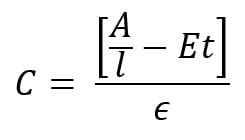
- C is the colour result.
- A is the sample absorbance.
- l is the cell path length.
- E is the scattering coefficient estimated at 0.00264 NTU-1 cm-1.
- t is the turbidity.
- e is the color absorptivity coefficient.
What is Hardness?
‘Hardness’ is defined as the total concentration of alkaline earth ions (Ca2+, Mg2+, Sr2+ and Ba2+) in water. The Ca2+ and Mg2+ ions dominate the alkaline earth ions. Therefore, one can refer to total hardness as the total concentration of the Ca2+ and Mg2+ ions in solution. Hardness is expressed as mg CaCO3/L water sample (ppm CaCO3).
Read MANTECH’s hardness method abstract here.
What is the recommended type standard for automated Turbidity Calibrations and Quality Control?
MANTECH recommends the use of turbidity standards made with suspensions of microspheres of styrene-divinylbenzene copolymer for all turbidity applications. Standard Methods dictate that “Secondary standards made with suspensions of microspheres of styrene-divinylbenzene copolymer typically are as stable as concentrated formazin and are much more stable than diluted formazin.” Any dilutions used to prepare turbidity standards, as well as blanks, must use degassed DI water. This is especially important for accurate low-end turbidity analysis, as there is often a positive bias due to bubbles introduced into the DI water solution when it is being produced/dispensed. This effect becomes more noticeable with lower NTU readings, and can cause challenges with performing an accurate calibration. To degas DI water, it must be dispensed into a very clean bottle or container, and left to sit for ~24h. You will see bubbles form on the side of the container as the water degasses. After degassing, it is ready to use for blanks and standards preparation.
What is the wavelength measured for turbidity by Standard Methods (white light)?
Standard Method 2130B (Nephelometric Method) specifies that a laboratory or process nephelometer should have a detector system with a spectral peak response of 400 to 600 nm. MANTECH’s T10 and T20 Turbidity meters and automated turbidity applications conform to this requirement. The T10 and T20 turbidity meters are designed specifically to conform to the international requirements for reporting turbidity measurements. The IR version conforms to ISO 7027 and EN27027. The WL version conforms to APHA SM 2130B, ASTM D1889, and EPA 180.1. Both can be used on the same system if conforming to multiple standards is required.
How is alkalinity speciated into carbonate, bicarbonate and hydroxide fractions?
The main compounds of alkalinity are: hydroxides (OH–), carbonates (CO32-), and bicarbonates (HCO3–). The alkalinity, or buffering capacity, of a solution depends on the absorption of positively charged hydrogen ions by negatively charged bicarbonate and carbonate molecules. When bicarbonate and carbonate molecules absorb hydrogen ions, there is a shift in equilibrium without a significant shift in pH. A sample with high buffering capacity will have high bicarbonate and/or carbonate content, and a greater resistance to changes in pH.
For more information on MANTECH’s method for automated alkalinity measurement and how the species of alkalinity are calculated, download the pdf.
What is Alkalinity?
Alkalinity refers to the capability of water to neutralize acid, also known as an expression of buffering capacity. A buffer is a solution to which an acid can be added without changing the concentration of available H+ ions (without changing the pH) appreciably. In other words, a buffer absorbs the excess H+ ions and protects the water body from fluctuations in pH.
Read MANTECH’s alkalinity method abstract here
General Information
How does MANTECH perform automated in-line filtering of samples?
The MANTECH color system can be set up with a multiple in line filters in parallel between the autosampler and the spectrophotometer. The system pumps sample through the filter and automatically switches from one filter to the next at the specified times. This can either be determined by a set number of samples per filter, or by a flow detection system where there is a sensor detecting when the flow through the filter drops below a certain threshold, at which point the system automatically switches to the next fresh filter and continues the run.
A general example of the run sequence using flow detection would be:
- Sample 1 runs through filter 1, flow does not decrease below the threshold, no change of filter
- Sample 2 runs through filter 1, flow does not decrease below the threshold, no change of filter
- Sample 3 runs through filter 1, flow decreases below threshold for clogged valve, system switches to filter 2
- Sample 4 runs through filter 2, flow does not decrease below the threshold, no change of filter
- Sample 5 runs through filter 2, flow decreases below threshold for clogged valve, system switches to filter 3
- Sample 6 runs through filter 3, flow does not decrease below the threshold, no change of filter
- Etc. for remainder of samples, or until all filters are clogged up
- If all filters become clogged up, run pauses and informs user to switch the filters and start back up
How does Dynamic Injection Control work on a MANTECH automated titration system?
MANTECH utilizes a method called Dynamic Injection Control while performing an automated titration to ensure that the titration curve is smooth and accurate, leading to the best precision on results. Dynamic injection control works by providing a user set volume range for each injection, with the range being between 25mL and 0.001mL for any single injection and then applying different volume injections to try and achieve a target change in the electrode measurement. The electrode measurement can either be pH units or millivolts.

For example, the titration can be set with a volume range of 0.01mL to 1.00mL, with a target change in electrode measurement of 10mV per injection. The system will start with an injection in the middle of the range, for example 0.1mL, and then look at the change in mV as a result of that injection. If the change in mV is less than the target, then the next injection increases in size, for example to 0.2mL. The system will again look at the change in mV from that last injection, then take that into account in determining the size of the next injection. Using this method, the automated titration can move quickly with large injections through portions of the titration where little change in the measurement is occurring, then automatically detect when the titration is approaching an endpoint and dynamically decrease the injections as the rate of change increases to ensure the most precise detection of the endpoint volume.

In addition to looking at measurement the rate of change, or first derivative, of the titration curve, the MANTECH automated titration system also looks at the second derivative of the curve. The second derivative represents the acceleration of the measurement and has a significant impact on the system’s ability to detect a rapid inflection, for example due to strong acid/base titrations and colorimetric titrations where the endpoint change occurs very rapidly.

The MANTECH Pro software provides the user with full control over the dynamic injection control settings, including the min/max injection volume, starting injection volume, target change in mV or pH, and other useful settings such as endpoint windows and differing smoothing settings for the first and second derivative determination. Contact MANTECH at [email protected] for more information!
Does the MANTECH Buret conform to Class A buret specifications?
Yes, MANTECH burets conform to Class A specifications as per ASTM E287 – Standard Specification for Laboratory Glass Graduated Burets. The standard defines the requirements for Class A and B burets as follows:
TABLE 1 Requirements for Burets
| Graduated Scale | |||||||
| Capacity, mL |
Subdivision, mL Class A and B |
Class A Scale Length, mm 0 to Capacity |
Class B Scale Length, mm 0 to Capacity |
Distance, Top of Buret to “0” Graduation, mmA |
Class A and B Number Each, mL |
Class A Volumetric Tolerance, ±mL |
Class B Volumetric Tolerance, ±mL |
| 10 | 0.05 | 350 to 450 | 250 to 450 | 30 to 75 | 0.5 | 0.02 | 0.04 |
| 25 | 0.1 | 350 to 450 | 250 to 450 | 30 to 75 | 1 | 0.03 | 0.06 |
| 50 | 0.1 | 500 to 600 | 500 to 600 | 40 to 100 | 1 | 0.05 | 0.10 |
| 100 | 0.2 | 550 to 650 | 550 to 650 | 40 to 100 | 2 | 0.10 | 0.20 |
MANTECH burets are available with 10mL and 25mL syringes, and have a resolution of roughly 100,000 steps providing precise injections down to the microliter level. Actual performance of burets and syringes are verified in MANTECH’s QC process with accepted tolerances exceeding requirements of ASTM E287, and a report is provided with each new syringe.
Users can perform their own verification of dispense volume accuracy by navigating to Hardware>Manual Control>Buret in MANTECH Pro software
How does MANTECH account for temperature compensation and correction in conductivity measurements?
Conductivity is a temperature dependent measurement. All substances have a conductivity coefficient which varies from 1% per °C to 3% per °C for most commonly occurring substances. The automatic temperature compensation on the MANTECH Conductivity meter defaults to 1.91% per °C, this being adequate for most routine determinations.
Temperature-corrected Conductivity is calculated by:
- Subtract the current temperature of your standard from 25°C (or whichever reference temperature applies).
- Multiply the result by 1.91% which is your default temperature coefficient.
- Multiply the result by the uncorrected conductivity value.
- Add the result to the uncorrected conductivity value. If the sample temperature is higher than the reference temperature, the result of step 1, 2, and 3 are negative numbers so it is a subtraction from the uncorrected conductivity value.
- The result is the corrected conductivity value.
Example: Uncorrected conductivity value is 1200uS, current temperature is 21.4°C, reference temperature is 25°C, default correction factor of 1.91%
- 25.0 – 21.4 = 3.6
- 3.6 * 0.0191 = 0.06876
- 0.06876 * 1200 = 82.51
- 1200 + 82.51 = 1282.51uS <— Temperature Corrected Value for Reference Temperature 25°C
Conductivity readings varying with temperature may be due to the substances under test having a coefficient other than the typical value of 1.91% per °C. To eliminate this variation it is necessary to maintain all samples at the reference temperature by use of a thermostatic water bath or equivalent.
Adjustment may be made by entering the 4510 conductivity meter SETUP menu and selecting COEFF. The reading can then be adjusted to the required value (0.00 to 4.00) by using the keypad. A setting of 0.00 will mean that there is no temperature compensation being applied.
How does MANTECH account for temperature compensation and correction in pH measurements?
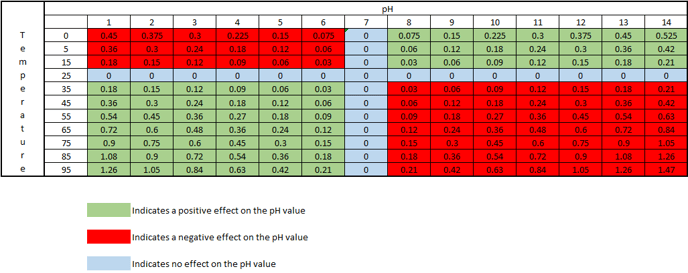
As the temperature of a solution changes, the actual pH changes. This is not an error of the probe or meter being used, but is the actual pH of the solution at that particular temperature. The temperature effect on the pH value is 0.003 pH units per oC away from 25oC, per pH units away from pH 7. This effect can be either negative or positive, depending on if the temperature is above or below 25oC, and if the pH is above or below pH 7. At 25oC and pH 7, there is no change in the pH value.
The chart below shows how the actual pH changes with temperature and pH, which allows you to correct the pH reading to 25oC. As an example, if a sample measured pH 5 at a temperature of 5oC, the chart indicates this a negative effect, therefore the sample pH would be 5 – 0.12 = 4.88pH corrected to 25oC:
MANTECH software accounts for temperature by recording the temperature during calibration via a thermistor probe, then it corrects the pH reading at the time of measurement to account for the difference in measured temperature of the sample vs. the calibration buffers. The reported pH value is the corrected value @ the sample temperature. The equation below shows how the PC-Titrate software calculates pH:
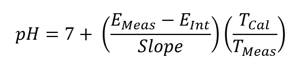
EMeas = Voltage measure by electrode at the time of titration (mV)
EInt = Voltage of the Intercept value calculated from the calibration equation. (mV)
Slope = slope of the line calculated from the calibration equation. (mV)
TMeas = temperature measured at the time of pH measurement (K degrees)
TCal = temperature taken at the time of last calibration. (K degrees)
MANTECH also offers the option to report pH values corrected to a set temperature, such as 25°C. This is implemented in the software as an additional step after the sample pH is recorded. MANTECH offers this as a feature for new MT-Series systems, or as an upgrade to existing MANTECH systems.
How do MANTECH systems measure and record temperature?
The standard method for measuring temperature is with a USB-connected stainless steel thermistor probe. The specifications for this probe are below:
- Communication: USB controlled by MANTECH Pro Software
- Sheath Material: Super OMEGACLAD XL/ Stainless Steel/Inconel
- Temp Range: 0 to 1038 Degree C.
- Diameter: 0.062in
- Length: 6 inch
- Measurement to 3 decimal places
- Autocalibration feature in MANTECH Pro software
Alternatively, when measuring conductivity, one can measure the temperature directly from the conductivity probe. This temperature is also displayed directly on the conductivity meter screen.
MANTECH has the ability to use either of these measurement methods for pH temperature compensation, depending on customer preference and system configuration.
MANTECH temperature sensors are available in both PT1000 and 10kNTC styles. PT1000 sensors have a linear positive-slope relationship between resistance and temperature with a resistance of 1000 ohms at 0°C, and 10kNTC sensors have a curved negative-slope relationship between resistance and temperature with a resistance of 10,000 ohms at 25°C. Both these models of temperature sensor perform well and comparably within the 0-100°C temperature range that liquid samples exist in. If you require a specific type of temperature sensor, please feel free to let MANTECH know and we will accommodate.
What is the minimum total liquid volume that can be measured for pH, conductivity and alkalinity with the MT Systems?
When using 50mL sample tubes, the minimum total volume can be as small as 6 ml using the TitraPro4 pH electrode and the MANTECH 5mm conductivity probe. This is due to the lower immersion depth of these electrodes and precise autosampler coordinate specifications. When using 125mL sample cups, the minimum total volume can be as small as 15mL.
MANTECH Pro Software™
What are shortcuts in MANTECH Pro Software™?
Shortcuts are customizable buttons that users can create from pre-saved templates generated on Run Configuration table. Shortcuts can have its own unique image and be organized by custom headers.
PC-Titrate Upgrade
What does it mean if I want to upgrade from PC-Titrate to MANTECH Pro Software™?
To ensure a seamless transition for all end-users, PC-Titrate and MANTECH Pro Software™ can run simultaneously from the same computer. Also, MANTECH Pro Software™ has backward compatibility and will operate with most existing hardware. Contact our team to discuss your options.
What will happen with the data on PC-Titrate? Will it be imported into MANTECH Pro Software™?
PC-Titrate can remain the computer currently operating your system and data can be viewed at anytime. Therefore, your data will not be lost and can be kept on that computer. Data saved/archived from PC-Titrate will not be able to be transferred onto MANTECH Pro Software™. Note: To avoid any complications while operating MANTECH Pro Software™, be sure to not use any actions in PC-Titrate that use the Interface, especially during a run on MANTECH Pro Software™.
I have an existing PC-Titrate. How do I upgrade and install MANTECH Pro Software™?
Note: Service and support for PC-Titrate software ended June 30, 2026 and PC-Titrate hardware ends December 31, 2027.
To upgrade and install MANTECH Pro Software™ is simple if you have a PC-Titrate. Once an order is placed, a member from MANTECH’s QC team will contact you for your active hinterland database. Once that information is verified, we will copy the methods to MANTECH Pro Software™ and send a USB with the needed adapters for the hardware.
If needed, a member of our team is available to schedule a meeting to ensure that the methods and reports are working to your specific needs.
How to install MANTECH Pro in 4 easy steps:
- Double click on the installer from the USB. Select “Yes” to proceed with the installation. Select “Next” once prompted and unselect “Read Me” once the installation is complete.
- Once the program has been installed, open the %programdata% folder on your computer by searching it in the taskbar. Once that has been opened, use the following pathway to find the folder \MANTECH\MANTECH PRO\Database.
- Add the DB.SQLite file from the USB to the database folder. Add the tray file from your USB to the Tray Files Folder and move the Documents folder from the USB to the MANTECH PRO Folder.
- You will now be able to register your MANTECH Pro Software™, using the product key and USB.
The best part, PC-Titrate and MANTECH Pro Software™ can operate on the same computer with the same hardware minimizing downtime and making the transition easy and risk-free!
PeCOD® COD/BOD Analyzer
General Information
Why are my PeCOD values reading low in comparison to the dichromate method?
The most common cause is chloride interference.
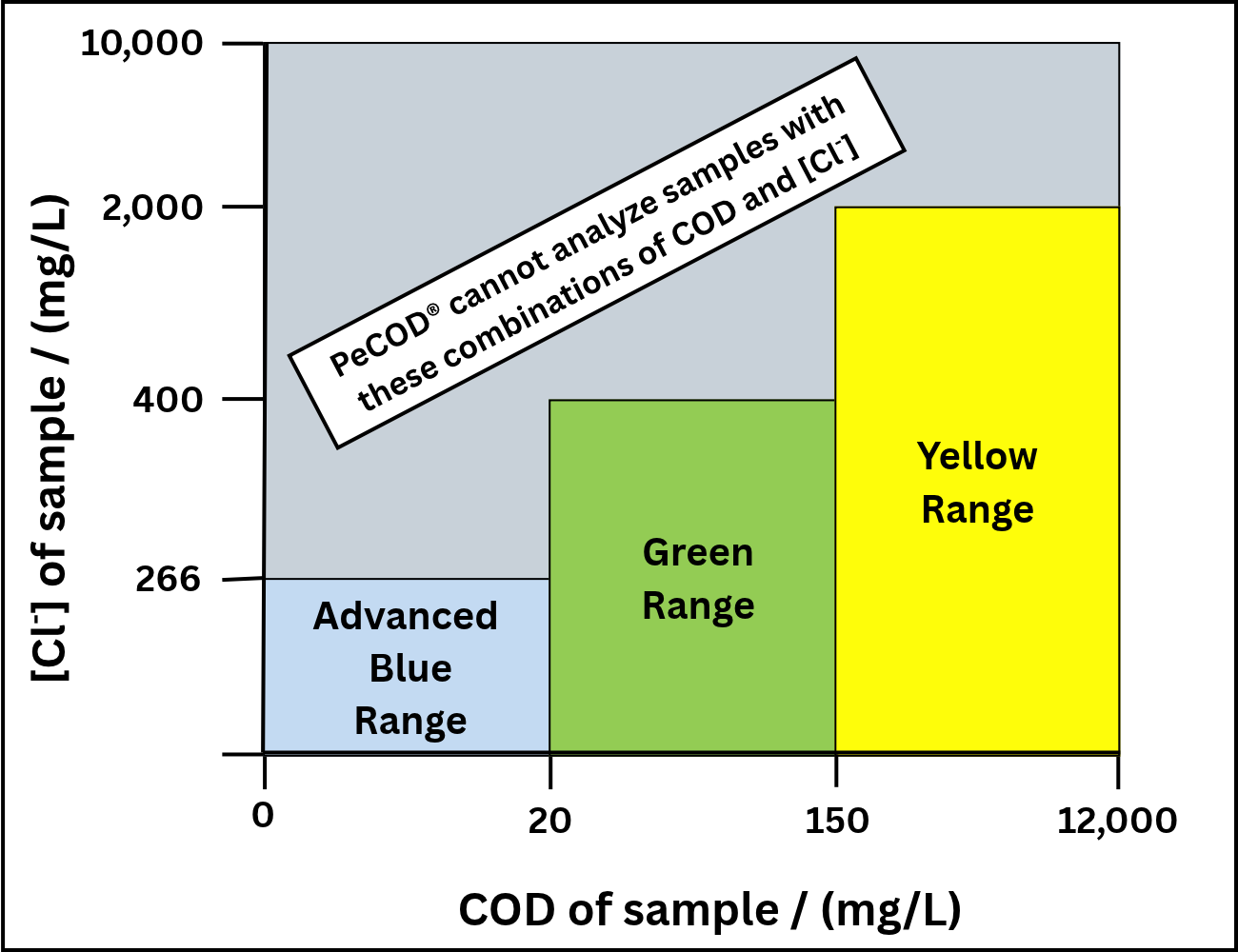
Chloride interference can impact COD outputs no matter what methodology is used. For the PeCOD method, the interference is negative – the samples are measured as having lower COD values than expected (see the figure below for recommended limits). Meanwhile for the dichromate method, the interference is positive and results in higher COD values. This results in a significant discrepancy between the two different methods with neither measurement accurate when a chloride interference exists!
The solution for this challenge is as simple as diluting the problematic samples until the chloride concentration falls below the maximum allowance. The lowest range on the PeCOD has a maximum allowance of 400 mg/L while the dichromate method’s is 100 mg/L according to Standard Method 5220. This can be increased to 1500 mg/L with supplementary mercury sulphate. Additionally, the detection limit of COD in the PeCOD is 0.7 mg/L in Advanced Blue and 1.0 mg/L in Green range. It is 50 mg/L for the dichromate method when looking for quantitative results or 1.0 mg/L when estimated. This makes the PeCOD more suitable for both low-COD high-chloride samples as well as samples that need significant dilution due to high chloride levels.
In addition to the PeCOD method having higher chloride tolerance with lower detection limits, COD (and BOD) results are generated in 10 minutes utilizing a safe and green method.
Can the PeCOD® analyzer analyze sludgy/dirty samples with large particles?
For samples containing particles larger than 50μm, a pre-filtration or homogenization step is required. For biochemical oxygen demand (BOD) analysis, a simple pre-filtration step is required. MANTECH has a Sample Filtering Guide for PeCOD® Analysis. For chemical oxygen demand (COD) analysis, no filtering required as we recommend a homogenizer that gets all particles to a 1micron size. MANTECH recommends:
PRO200 Homogenizer with SS Probe – This is our base model and setup can be used within 5ml-50ml tubes with sample piece size of 10mm or less or liquid base sample up to 100ml. (MANTECH part number: PCH-4000-197)
PRO250 Homogenizer with SS Probe – When there is a more viscous/thick or larger solid sample piece over 10mm, our 20mm X 115mm SS Probe would be needed. This homogenizer & probe setup can cover 50ml-500ml tubes/beakers. Other probes can be used with this Homogenizer for even larger volumes. (MANTECH part number: PCH-4000-198)
Homogenization can be automated using the autosampler arm and in our online analyzer.
For pulp and paper and wastewater applications, MANTECH recommends using a 35um polyethylene (PE) syringe filter. These filters can contribute trace amounts of organics, which are negligible for wastewater applications. For drinking and source water applications it’s important to use a filter that does not contribute organics to the filtered sample. One of MANTECH’s research partners has recommended a 0.45um polyether sulfone (PES) filter; however, other filter types may also be acceptable, if no organics are contributed by the filter. Since these applications traditionally see less particulates, having a smaller pore size filter hasn’t shown an impact on the PeCOD® results.
What is the allowable COD/chloride concentration combinations for PeCOD® analysis?
There are limitations to ensure that after dilution with electrolyte the chloride concentration will be <200mg/L. This means that the allowable chloride concentration of the original sample varies depending on the COD range since each range has a different ratio of sample to electrolyte.
The chart for all the ranges can be viewed here.
Does PeCOD® conform to regulatory standards?
PeCOD® is utilized as an internal process control tool to make impactful real-time decisions.The PeCOD® conforms to regulatory standards such as the ASTM International Method D8084, the Ministry of Environment, Conservation and Parks, Ontario (MECP) method E3515, and the Health Canada Guidance on drinking water. The ASTM International method for photoelectrochemical oxygen demand is approved for measuring organics in freshwater sources and treated drinking water. The Ontario MECP method E3515 replaced the standard dichromate methods due to the fact that no harmful chemicals are used in the peCOD method. This method now includes PeCOD® as an approved alternate COD method in the Municipal and Industrial Strategy for Abatement (MISA). The PECOD method is also referenced in the Health Canada Guidance on Natural Organic Matter in Drinking Water. COD has been added as a parameter with a <5ppm limit, only the peCOD method is referenced for the parameter, and peCOD is also referenced as a “parameter” to monitor in source waters for drinking water plants. Learn more here.
PeCOD® Consumables
How can I make Calibrant and Check Standard solutions?
View our instructions for producing 1L calibrants, check standards and for more information on these solutions here.
What are the PeCOD® electrolyte and calibrant solutions composed of?
PeCOD® reagents are composed of salt- and sugar-based solutions for safe operation and require NO hazardous waste removal. The PeCOD® electrolyte solution is mainly composed of a low-concentration lithium nitrate solution. The PeCOD® calibrant and check standard solutions supplied by MANTECH are composed of sorbitol. These solutions contain a trade recipe preservative that allow for the longer shelf life, compared to solutions prepared manually. Calibrant and check standard solutions prepared manually, following the PeCOD® Standard Recipe, can be used for up to two weeks. View MANTECH’s Safety Data Sheets here and choose PeCOD – Slurry Solutions.
How many PeCOD® samples can be analyzed with the reagent starter kit?
How long does a sensor last in the PeCOD® Analyzer?
Other
General
General Information
Where can I find MANTECH’s certificates of analysis?
All certificates of analysis can be found on our Dropbox. Please click here to be redirected to the C of A page, then choose the appropriate folder.
Where can I find MANTECH’s SDS’s?
The SDS’s to all solutions are posted on our Dropbox. Please click here to be redirected to the SDS page, then choose the appropriate folder.
What is MANTECH’s mailing address?
Our corporate address is 5473 Hwy 6 North, Guelph, ON N1H 6J2 Canada. Our USA address is 22628 Island Pines Way, Unit 1604, Fort Myers Beach, FL 33931, USA.
Orders & Shipping
Does MANTECH accept credit card payments?
Yes, MANTECH accepts credit card payments. To place an order, email us at [email protected] or call +1 (519) 763-4245 (or US toll-free +1 (866) 763-2122) ext 812. Note: MANTECH does not accept credit card payments from American Express.
Service Agreements
Does MANTECH offer services globally?
Yes, MANTECH calls on our team of Technical Representatives in Canada and US as well as our network of distributors supporting 50+ countries worldwide. To find your regional MANTECH Technical representative or Distributor, click here.
What is included with a preventative maintenance?
Preventative maintenance visits include inspection, cleaning, calibration, and replacement of consumable parts (included in MANTECH’s PM kits).MANTECH can arrange for a member of MANTECH’s team of regional Technical Representatives located throughout the U.S. and Canada will come on-site to interact face-to-face with your team and perform all necessary maintenance to your system or connect remotely with your team to provide a detailed, step-by-step walkthrough of system maintenance to same quality of an on-site visit.
How to I contact MANTECH’s service team?
There are few ways you can get in contact with MANTECH’s service team. Complete this form, Email [email protected], Call +1 (519) 763-4245 (or US toll-free +1 (866) 763-2122) ext 811. To discover MANTECH’s service options visit our website here.
Support and Troubleshooting
Applications
Why does my turbidity method require a multi-line calibration?
For turbidity, the reasoning is a bit different. The MANTECH turbidity flow cell has specific optical properties which are different than the cuvettes which you would manually insert (for example the sealed standards for the 3-month calibration). The difference in optical properties between the flow cell cylinder and the cuvette can cause the relationship between actual NTU and expected NTU to be slightly non-linear. And like the fluoride, this is really only applicable in the low end of the measuring range, typically <1NTU. To ensure the lowest detection limit possible, we use multi-line to accurately capture how the optical properties of the flow cell are different than the cuvettes.
BOD Pro Software™
How do you calculate seed correction and BOD?
To learn how to calculate Seed Correction and BOD, please refer to this document. In BOD Pro Software™, two separate values for Seed Correction Factor are stored along with the Run; one is referred to as BODSeedCorrection, and the other CBODSeedCorrection. The way we calculated BODSeedCorrection in BOD Pro is as follows: 1. Dividing the depletion of each BOD Seed bottle by its own volume (the seed volume), the resulting quantity is referred to as DepletionPerMLSeed, 2. and then we average the DepletionPerMLSeed over all the BOD Seed bottles. CBOD Seed Correction was calculated by doing the same on CBOD Seed bottles. The software allows for only one Seed ID to be included in the Run. There can be any number of BOD or CBOD Seed bottles within that Seed ID group.
Is PC-BOD software compatible with Windows 10 or 11 Pro OS?
As a result of major security updates Microsoft has implement, MANTECH cannot guarantee that PC-BOD software will operate if updates in Windows 10 or 11 Pro operating systems. PC-BOD software can operate in virtual mode however, this leaves the analyzer vulnerable to viruses (leading to corrupted databases) and could impact the software when Windows updates are performed. Here is some more information about everything you need to know before updating to Windows 10…read more. In 2021, MANTECH introduced a line of all new hardware and BOD Pro Software™ designed for Windows 10 and 11 Pro OS – meaning that all security and OS updates can run concurrently.
There are a few different options to move forward:
- Install PC-Titrate on Windows 10 computer (no guarantee).
- Replace the entire system (all new hardware and software) with a trade-in discount for your existing system.
To discuss your options, please contact our team here.
How do I setup a run in BOD Pro Software™ in which a bottle was pre-filled with dilution water or seed?
Procedure:
- Navigate to Template/Run Screen Settings.
- The main Run Screen adjusted will be the Initial BOD (i.e. Run Initials).
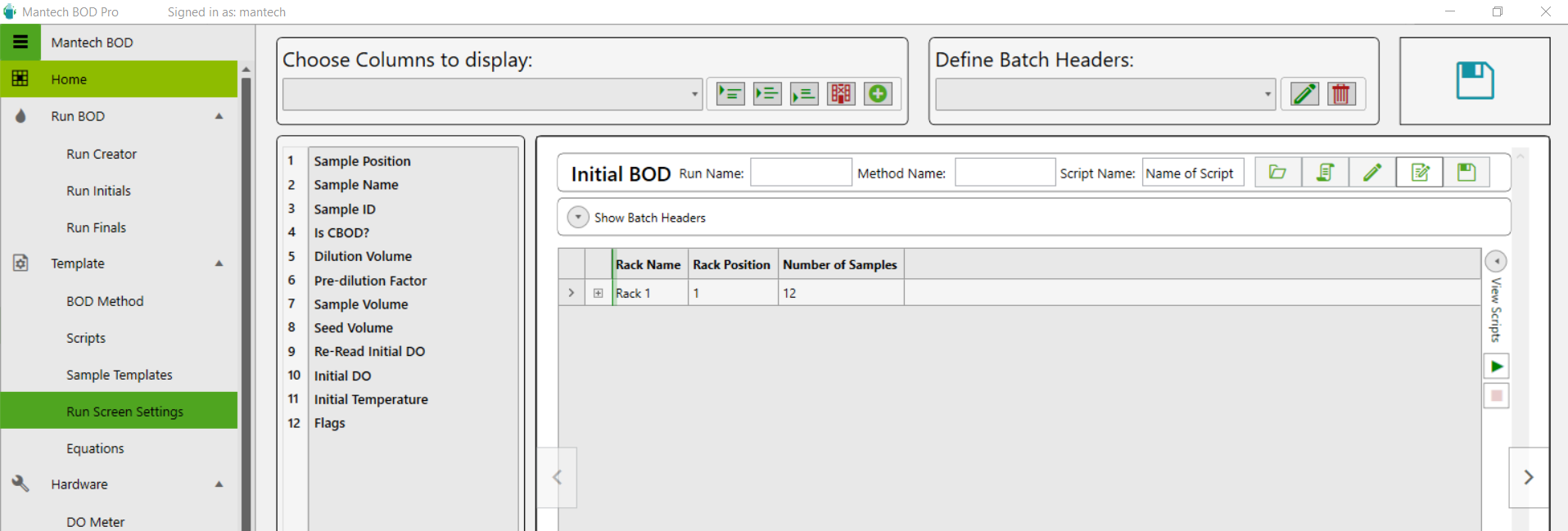
- The main Run Screen adjusted will be the Initial BOD (i.e. Run Initials).
- At the top, under the section called Choose Columns to display, there is a dropdown menu that will list all the possible columns that could appear on the Initials run screen. Locate ‘Dilution Added?’ and ‘Seed Added?’.
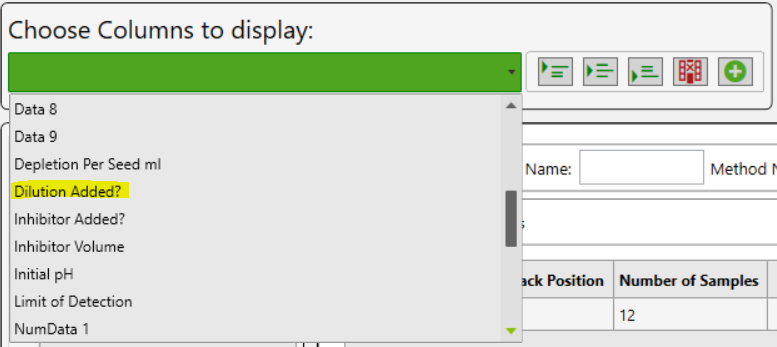
- Use any of the three options to insert into the list of columns down below.
- The column can be selected, then dragged into the desired position.

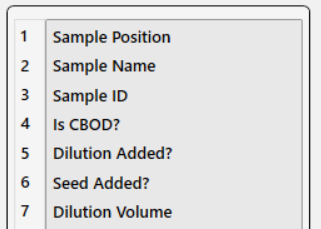
- The column can be selected, then dragged into the desired position.
- Repeat for all desired columns, and then click Save located on the top right of the screen.
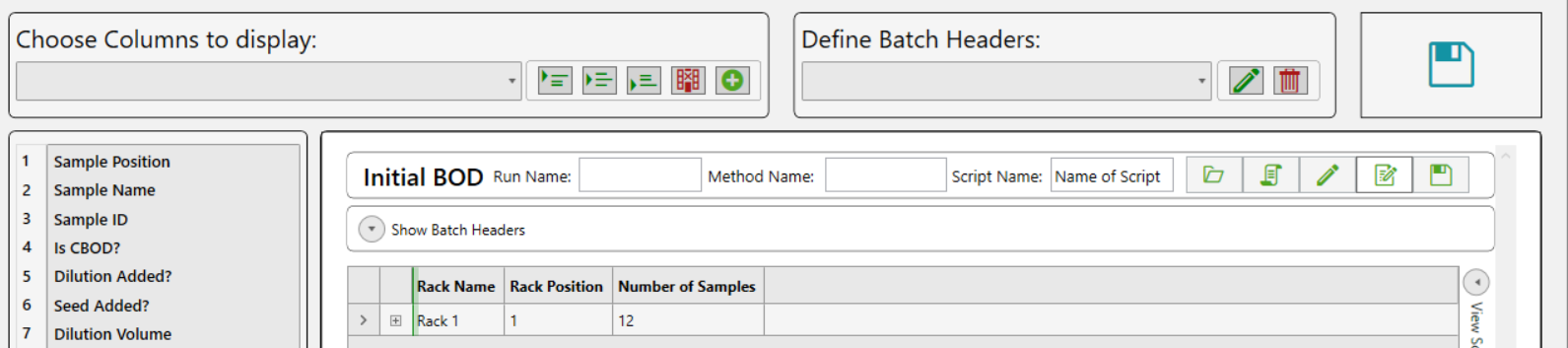
- Runs loaded on the Run Initials Screen will display the new additional columns. Simply check the checkbox if one or all of the reagent options were dispensed/pre-filled in the bottle.

Need assistance? Contact our technical support team here.
Hardware
How do I change the buret IP address?
MANTECH burets have a static IP address assigned to them. These addresses can be changed if there are communication issues between the buret and the software. To avoid IP address conflicts, MANTECH recommends that all burets on the same network have unique IP addresses, not just ones on the same system. If an IP address needs to be changed, then you can manually change it using the following steps found here.
How do I store my MANTECH Electrodes?
MANTECH recommends storing pH and other electrodes immersed in a 1:10 dilution of pH 4 buffer in Tap Water. Conductivity electrodes can be stored in air for system configurations that do not place it on the same holder as another electrode.
How do I retrieve calibration records from my YSI 4010 MultiLab IDS meter?
The YSI 4010 MultiLab IDS meter will store the records for the last 10 calibrations performed on the meter. The instructions for retrieving these calibrations can be found on Technical Bulletin 2021 – 010.
MANTECH Pro Software™
Is PC-Titrate software compatible with Windows 10 or Windows 11 Pro OS?
As a result of major security updates Microsoft has implement, MANTECH cannot guarantee that PC-Titrate will operate with updates in Windows 10 or 11 Pro operating systems. PC-Titrate can operate in virtual mode however, this leaves the analyzer vulnerable to viruses (leading to corrupted databases) and could impact the software when Windows updates are performed. Here is some more information about everything you need to know before updating to Windows 10…read more. In 2021, MANTECH introduced a line of all new hardware and MANTECH Pro Software™ designed for Windows 10 and 11 Pro OS – meaning that all security and OS updates can run concurrently.
There are a few different options to move forward:
- Install PC-Titrate on Windows 10 computer (no guarantee).
- Upgrade the software to MANTECH Pro Software™ which is backwards compatible with most hardware.
- Replace the entire system (all new hardware and software) with a trade-in discount for your existing system.
To discuss your options, please contact our team here.
Get Smarter Solutions, Today.
Our innovative water and wastewater analyzers have faster, safer processes, with fewer hazardous reagents. Start using MANTECH solutions for more accurate data that drives responsible outcomes.