

Frequently Asked Questions
BOD Analyzer
General Information
How long does it take to measure initials and finals on a MANTECH AM400 series multi-rack system?
The length of time to measure initials and finals on a MANTECH AM400 series multi-rack system takes about 90 seconds but may vary depending on the method of sample preparation, sampler size, and probe style. For an individualized estimate contact us at [email protected].
MT Analyzer
General Information
How does Dynamic Injection Control work on a MANTECH automated titration system?
MANTECH utilizes a method called Dynamic Injection Control while performing an automated titration to ensure that the titration curve is smooth and accurate, leading to the best precision on results. Dynamic injection control works by providing a user set volume range for each injection, with the range being between 25mL and 0.001mL for any single injection and then applying different volume injections to try and achieve a target change in the electrode measurement. The electrode measurement can either be pH units or millivolts.

For example, the titration can be set with a volume range of 0.01mL to 1.00mL, with a target change in electrode measurement of 10mV per injection. The system will start with an injection in the middle of the range, for example 0.1mL, and then look at the change in mV as a result of that injection. If the change in mV is less than the target, then the next injection increases in size, for example to 0.2mL. The system will again look at the change in mV from that last injection, then take that into account in determining the size of the next injection. Using this method, the automated titration can move quickly with large injections through portions of the titration where little change in the measurement is occurring, then automatically detect when the titration is approaching an endpoint and dynamically decrease the injections as the rate of change increases to ensure the most precise detection of the endpoint volume.

In addition to looking at measurement the rate of change, or first derivative, of the titration curve, the MANTECH automated titration system also looks at the second derivative of the curve. The second derivative represents the acceleration of the measurement and has a significant impact on the system’s ability to detect a rapid inflection, for example due to strong acid/base titrations and colorimetric titrations where the endpoint change occurs very rapidly.

The MANTECH Pro software provides the user with full control over the dynamic injection control settings, including the min/max injection volume, starting injection volume, target change in mV or pH, and other useful settings such as endpoint windows and differing smoothing settings for the first and second derivative determination. Contact MANTECH at [email protected] for more information!
PC-Titrate Upgrade
What does it mean if I want to upgrade from PC-Titrate to MANTECH Pro Software™?
To ensure a seamless transition for all end-users, PC-Titrate and MANTECH Pro Software™ can run simultaneously from the same computer. Also, MANTECH Pro Software™ has backward compatibility and will operate with most existing hardware. Contact our team to discuss your options.
I have an existing PC-Titrate. How do I upgrade and install MANTECH Pro Software™?
Note: Service and support for PC-Titrate software ended June 30, 2026 and PC-Titrate hardware ends December 31, 2027.
To upgrade and install MANTECH Pro Software™ is simple if you have a PC-Titrate. Once an order is placed, a member from MANTECH’s QC team will contact you for your active hinterland database. Once that information is verified, we will copy the methods to MANTECH Pro Software™ and send a USB with the needed adapters for the hardware.
If needed, a member of our team is available to schedule a meeting to ensure that the methods and reports are working to your specific needs.
How to install MANTECH Pro in 4 easy steps:
- Double click on the installer from the USB. Select “Yes” to proceed with the installation. Select “Next” once prompted and unselect “Read Me” once the installation is complete.
- Once the program has been installed, open the %programdata% folder on your computer by searching it in the taskbar. Once that has been opened, use the following pathway to find the folder \MANTECH\MANTECH PRO\Database.
- Add the DB.SQLite file from the USB to the database folder. Add the tray file from your USB to the Tray Files Folder and move the Documents folder from the USB to the MANTECH PRO Folder.
- You will now be able to register your MANTECH Pro Software™, using the product key and USB.
The best part, PC-Titrate and MANTECH Pro Software™ can operate on the same computer with the same hardware minimizing downtime and making the transition easy and risk-free!
Other
General
Orders & Shipping
What is the HS code for MANTECH systems?
The HS code for MANTECH systems is: 9027.80. To check on the status of your order, please contact our Orders Team at [email protected].
How do I place an order?
To place an order, email us at [email protected] or call +1 (519) 763-4245 (or US toll-free +1 (866) 763-2122) ext 812. To ensure quick processing, orders should reference a MANTECH quotation number. To inquire about pricing and receive quotations for MANTECH products, complete this form or email us at [email protected].
Warranty Policies
What is MANTECH’s warranty policy?
MANTECH Instruments are warrantied for a period of one year (unless otherwise specified) from the date of shipment. This warranty covers defects in material and workmanship (parts and labour), under normal installation, use and maintenance, within the region of installation, as described in the operator’s instructions. Please refer to the user’s manual. This warranty does not cover Computer products, YSI branded products, consumables, expendable items or items with physical damage. Computer warranty/service is handled direct by the end users through the manufacturer. YSI warranty/service is handled direct by the end users through the local YSI distributor. For more information about extended warranty options, click here.
Service Agreements
How to I contact MANTECH’s service team?
There are few ways you can get in contact with MANTECH’s service team. Complete this form, Email [email protected], Call +1 (519) 763-4245 (or US toll-free +1 (866) 763-2122) ext 811. To discover MANTECH’s service options visit our website here.
Support and Troubleshooting
BOD Pro Software™
Is PC-BOD software compatible with Windows 10 or 11 Pro OS?
As a result of major security updates Microsoft has implement, MANTECH cannot guarantee that PC-BOD software will operate if updates in Windows 10 or 11 Pro operating systems. PC-BOD software can operate in virtual mode however, this leaves the analyzer vulnerable to viruses (leading to corrupted databases) and could impact the software when Windows updates are performed. Here is some more information about everything you need to know before updating to Windows 10…read more. In 2021, MANTECH introduced a line of all new hardware and BOD Pro Software™ designed for Windows 10 and 11 Pro OS – meaning that all security and OS updates can run concurrently.
There are a few different options to move forward:
- Install PC-Titrate on Windows 10 computer (no guarantee).
- Replace the entire system (all new hardware and software) with a trade-in discount for your existing system.
To discuss your options, please contact our team here.
How to setup DO stability settings in BOD Pro Software™?
Procedure:
- Navigate to Template/Scripts, then select Load Scripts.
- Quickest way to get started is loading the current script responsible for reading Initial/Final DOs (the instructions will be based on a single probe configuration) :
- Select the Initials Read script, then click Load (✔).
- Select Save As and define the script to be easily identified later (i.e. Initial Read Single Probe DO Stability).
- Double-click on the DO Read script action:
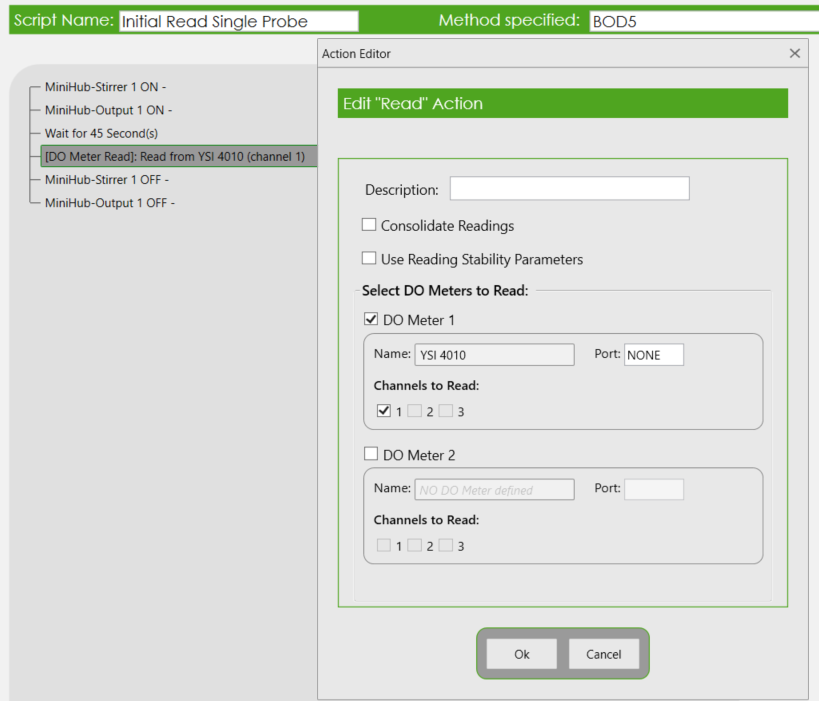
- Click on the ‘use Reading Stability Parameters‘ checkbox to enable the stability options feature.
- ΔDO: Change in Dissolved Oxygen.
- ΔT: Change in Time.
- Max Time: Maximum duration (i.e. Timeout).
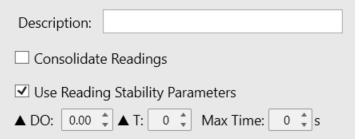
- MANTECH recommends the following Set Time stability settings shown below. Therefore, Max Time could be set based on this information, if the DO stability did not meet the configured stability criteria:
- Optical Probe: Initials 45 seconds, Finals 90 seconds
- Membrane Probe: Initials/Finals 45 seconds
- After entering in the desired values, click OK.
- Important Note: The set time of 45 seconds or 90 seconds above the DO read action should be removed. If it is not removed, the sequence will wait the set time, and then enter into the DO stability settings configured above. Click Save Script once completed.
- Repeat steps 3-9 for Finals.
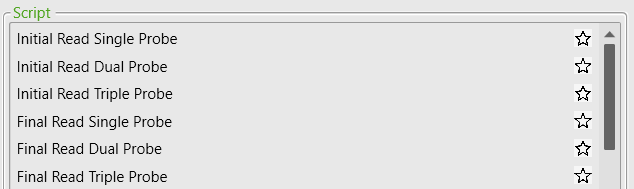
- Now, the main BOD sequence needs to be updated with these new read sequences. Click Load and find the main sequence used in standard operating BOD runs (Hint: The sequence might be favorited for easier referencing).
- Expand the Logic Condition ‘If (Processing Initials) Else‘ to expose the current read scripts.
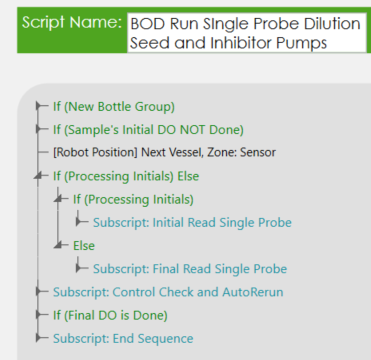
- Before removing the current scripts, it is easier to insert the new read scripts. Select the current read subscript first, then in the Dropdown menu beside Action, select Subscript. Then, click the Insert button. Select the respective read subscript.
- It is important that the script designated for Initials and Finals is added into the correct section of this Logic condition.
- The If holds the Initials read script sequence
- The Else holds the Finals read script sequence.
- After adding in the new read sequences, remove the previous scripts by selecting the script and using the Delete Scripts button.
- Click Save when completed.
Need assistance? Contact our technical support team here.
How do I setup a run in BOD Pro Software™ in which a bottle was pre-filled with dilution water or seed?
Procedure:
- Navigate to Template/Run Screen Settings.
- The main Run Screen adjusted will be the Initial BOD (i.e. Run Initials).
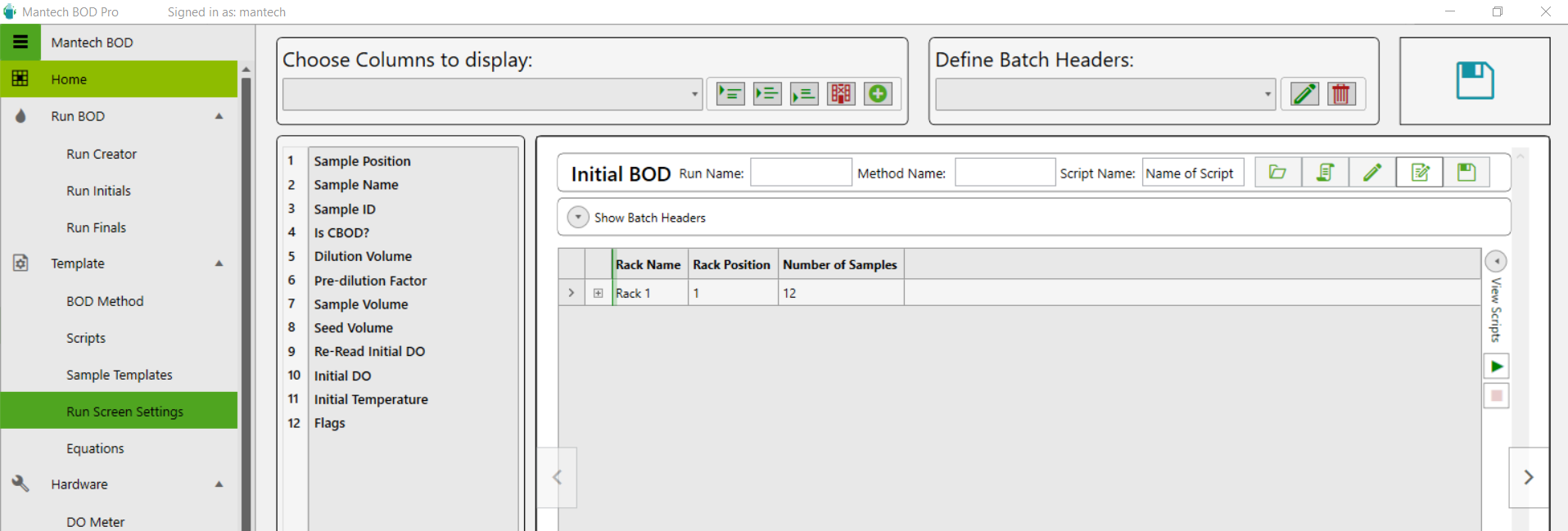
- The main Run Screen adjusted will be the Initial BOD (i.e. Run Initials).
- At the top, under the section called Choose Columns to display, there is a dropdown menu that will list all the possible columns that could appear on the Initials run screen. Locate ‘Dilution Added?’ and ‘Seed Added?’.
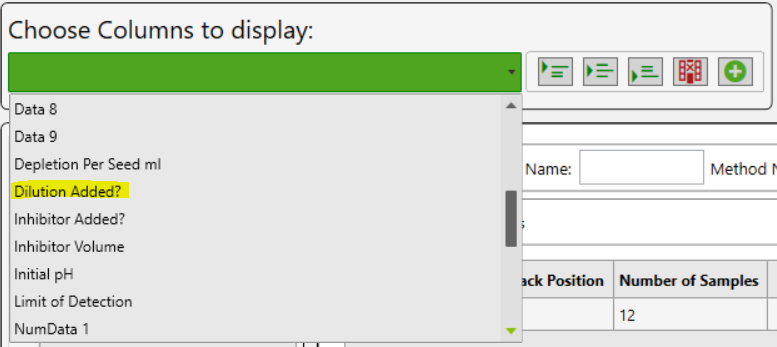
- Use any of the three options to insert into the list of columns down below.
- The column can be selected, then dragged into the desired position.

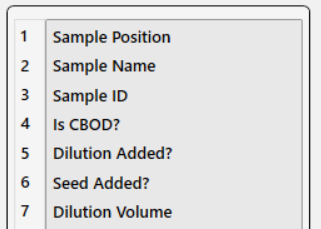
- The column can be selected, then dragged into the desired position.
- Repeat for all desired columns, and then click Save located on the top right of the screen.
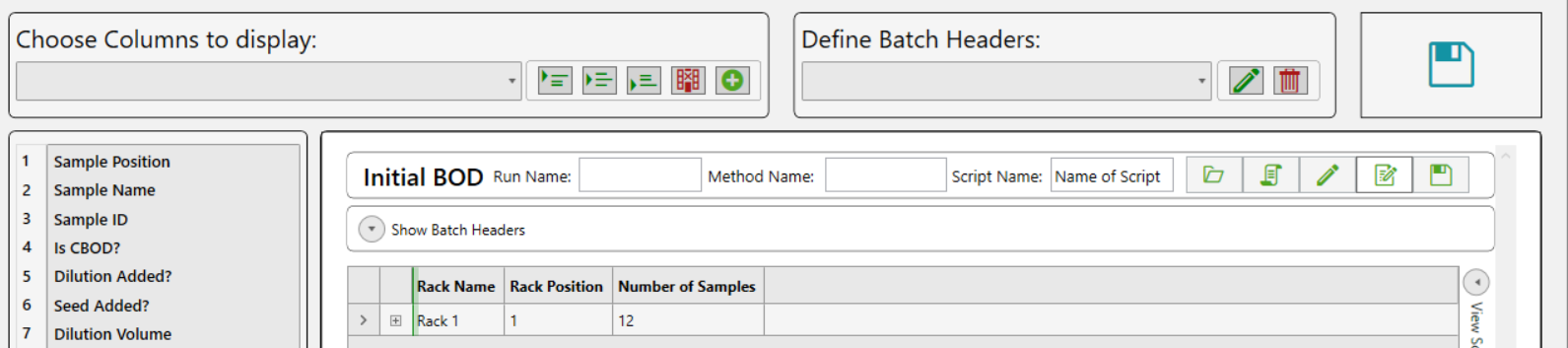
- Runs loaded on the Run Initials Screen will display the new additional columns. Simply check the checkbox if one or all of the reagent options were dispensed/pre-filled in the bottle.

Need assistance? Contact our technical support team here.
Hardware
MANTECH Pro Software™
Is PC-Titrate software compatible with Windows 10 or Windows 11 Pro OS?
As a result of major security updates Microsoft has implement, MANTECH cannot guarantee that PC-Titrate will operate with updates in Windows 10 or 11 Pro operating systems. PC-Titrate can operate in virtual mode however, this leaves the analyzer vulnerable to viruses (leading to corrupted databases) and could impact the software when Windows updates are performed. Here is some more information about everything you need to know before updating to Windows 10…read more. In 2021, MANTECH introduced a line of all new hardware and MANTECH Pro Software™ designed for Windows 10 and 11 Pro OS – meaning that all security and OS updates can run concurrently.
There are a few different options to move forward:
- Install PC-Titrate on Windows 10 computer (no guarantee).
- Upgrade the software to MANTECH Pro Software™ which is backwards compatible with most hardware.
- Replace the entire system (all new hardware and software) with a trade-in discount for your existing system.
To discuss your options, please contact our team here.
How do I calibrate the flowrate of an IntelliPump™ (peristaltic pump) in MANTECH Pro Software™?
Procedure:
- Navigate to Hardware/Hardware Configuration/Peristaltic Pump.
- If there are multiple peristaltic pumps on your instrument, ensure the correct pump is selected from the drop down menu. Ensure the Flow Rate Source is Measured Flowrate.
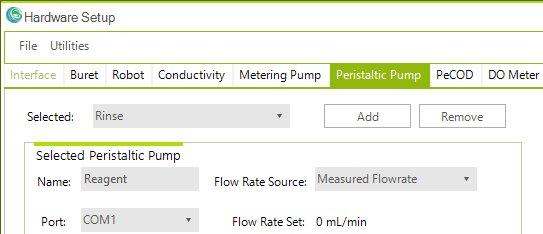
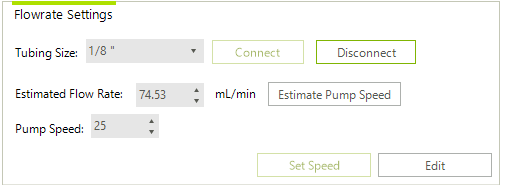
3. Select the Tubing size associated with the pump selected. Enter in a desired flowrate and click Estimate Pump Speed to automatically generate a speed that would be optimal to dispense the desired flow per minute. Next, click Set Speed.
- Note: The tubing size refers the tube’s inner diameter.
- Entering a pump speed instead would automatically generate an estimated flow rate.
4. Enter in the desired duration to operate the pump for, and then click Start. Note: Ensure the pump line is primed with solution before starting your flowrate test.
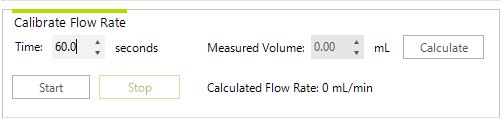
5. After the timer has counted down and the pump has dispensed solution, typically the test is repeated at least 3 times, and the averaged volume is calculated. Enter the averaged volume into the field called “Measured Volume”, then click Calculate. This will update the flowrate of the pump:
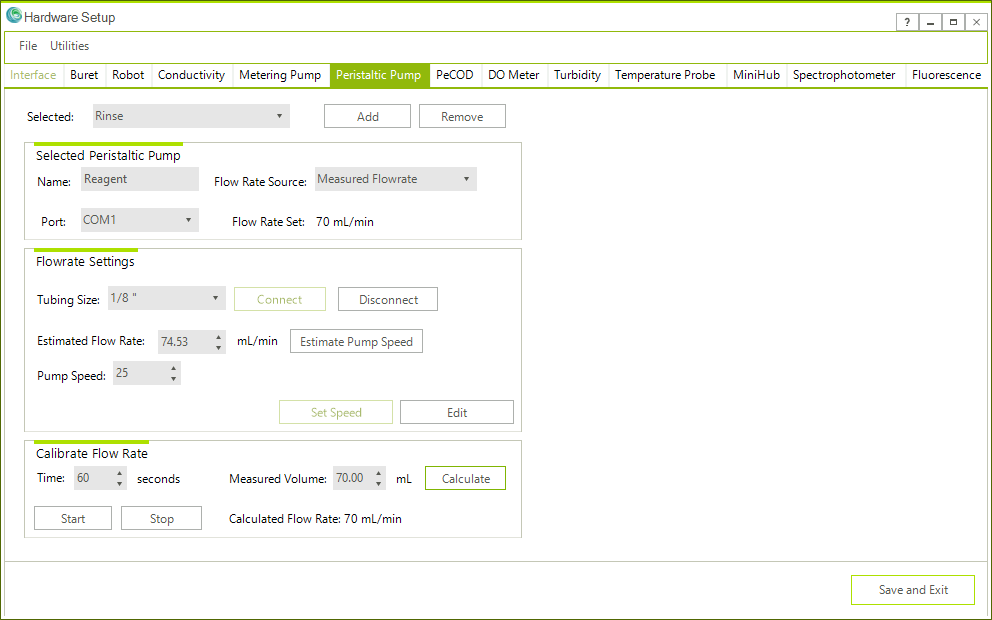
6. Click Save and Exit when finished.
Need assistance? Contact our technical support team here.
How do I calibrate the flowrate of an IntelliDose™ (metering pump) in MANTECH Pro software?
Procedure:
- Navigate to Hardware/Hardware Configuration/Metering Pump.
- If there are multiple metering pumps on your instrument, ensure the correct pump is selected from the drop down menu. Ensure the Flow Rate Source is Measured Flowrate.
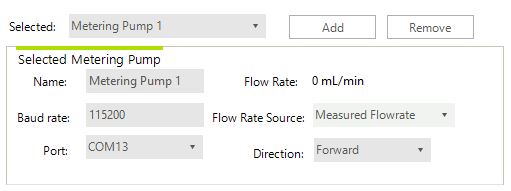
3. For the estimated flowrate, enter 30, then click Estimate Pump Speed. A Pump Speed of 300 RPM should appear. Now click Set Speed.
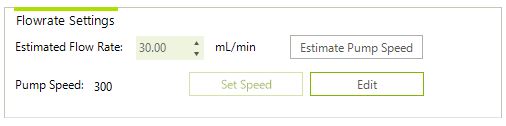
4. Enter in the duration you wish to operate the pump for, and then click Start. Note: Ensure the pump line is primed with solution before starting your flowrate test.
5. After the timer has counted down and the pump has dispensed solution, typically the test is repeated at least 3 times, and the averaged volume is calculated. Enter the averaged volume into the field called “Measured Volume”, then click Calculate. This will update the flowrate of the pump:
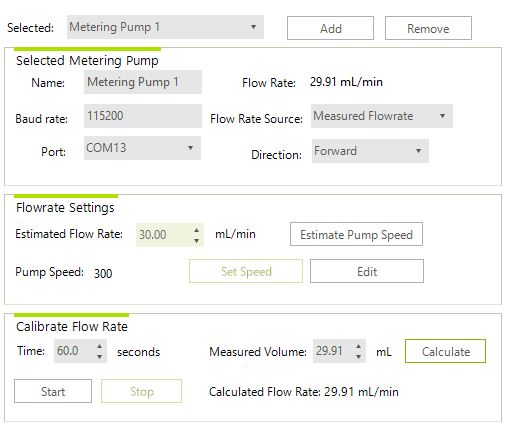
6. Click Save and Exit when finished.
Are you still experiencing difficulty calibrating your IntelliDose™ pumps? Contact our technical support team here.
Get Smarter Solutions, Today.
Our innovative water and wastewater analyzers have faster, safer processes, with fewer hazardous reagents. Start using MANTECH solutions for more accurate data that drives responsible outcomes.