

Frequently Asked Questions
MT Analyzer
Applications
How can the Permanganate Index test be automated?
MANTECH is able to automate all aspects of the permanganate index test including automated sample heating, acid and reagent addition, and titration with calculation of results. The analysis can also be optimized for maximum throughput capacity through a batch setup where multiple samples at once are heated, prepared, and analyzed all within the timing specified in the ISO 8467 method. Overall, the benefit of the batching process is much quicker time per sample overall since you are making use of the 10 minute wait times between adding the reagents instead of the system just sitting and waiting.
The time per sample for single analysis is roughly 25 minutes per sample taking into account all the waiting times and about 3 minutes for the actual titration.
For the batch analysis, you get roughly 12 samples per batch and the batch takes roughly 60 minutes to complete, making it only about 5 minutes per sample.
Below are the steps both for single analysis and batch analysis:
Single Analysis:
- A blank analysis performing the steps 3-11 listed below, using DI water as the sample, is run and the blank endpoint volume is used in the calculation of sample results for the run.
- After titrating the blank sample, 5mL of 0.005M Sodium Oxalate is added to the titrated sample, then after a brief mixing period the titration is performed again. The endpoint volume is recorded as the standardization volume and is also used in the calculation of sample results for the run.
- 25mL of the sample volume is pipetted into each sample beaker, and sample protect caps are placed on the beakers.
- The Heating Element are turned on. Heating is to be applied keeping the sample temperature between 96-98°C during the following steps until the element is turned off.
- The Sample Protect cap is removed and 5mL of 2.0M Sulfuric Acid is pipetted into a beaker. The stirrer turns on briefly to mix the solution, then the sample protect cap is placed on the beaker.
- 10-minute wait time.
- The Sample Protect cap is removed and 5mL of 0.002M Potassium Permanganate solution is added. The stirrer turns on briefly to mix the solution, then the sample protect cap is placed back on the beaker.
- 10-minute wait time.
- The Sample Protect cap is removed and 5mL of 0.005M Sodium Oxalate solution is added. The stirrer turns on to mix, at which point the solution will briefly change color but eventually become colorless.
- 1-minute wait time.
- The solution is titrated with 0.002M Potassium Permanganate to a faint pink color. This color is measured with the photometric probe.
- Steps 5 to 11 are repeated for all remaining samples.
Batch Analysis:
- A blank analysis performing the steps 3-13 listed below, using DI water as the sample, is run and the blank endpoint volume is used in the calculation of sample results for the run.
- After titrating the blank sample, 5mL of 0.005M Sodium Oxalate is added to the titrated sample, then after a brief mixing period the titration is performed again. The endpoint volume is recorded as the standardization volume and is also used in the calculation of sample results for the run.
- 25mL of the sample volume is pipetted into each sample beaker, and sample protect caps are placed on the beakers.
- The Heating Element are turned on. Heating is to be applied keeping the sample temperature between 96-98°C during the following steps until the element is turned off.
- The Sample Protect cap is removed and 5mL of 2.0M Sulfuric Acid is pipetted into a beaker. The stirrer turns on briefly to mix the solution, then the sample protect cap is placed on the beaker.
- Step 5 is repeated for multiple sample beakers in a row, until 10 minutes has elapsed since the acid was added to the first beaker. The set of beakers that get acid added to them within the 10 minute time become the first “batch”.
- After 10 minutes has elapsed, the system moved back to the first sample beaker in the batch.
- The Sample Protect cap is removed and 5mL of 0.002M Potassium Permanganate solution is added. The stirrer turns on briefly to mix the solution, then the sample protect cap is placed back on the beaker.
- Step 8 is repeated for the remaining beakers in the batch determined from Step 6. Roughly 10 minutes should elapse from when the permanganate was added to the first beaker.
- After 10 minutes has elapsed, the system moved back to the first sample beaker in the batch.
- The Sample Protect cap is removed and 5mL of 0.005M Sodium Oxalate solution is added. The stirrer turns on to mix, at which point the solution will briefly change color but eventually become colorless.
- 1-minute wait time.
- The solution is titrated with 0.002M Potassium Permanganate to a faint pink color. This color is measured with the photometric probe.
- Steps 11-13 are repeated for the remaining samples in the first batch.
- After the first batch is complete, the system repeats steps 5-14 for all remaining samples in the run, creating as many “batches” as required to complete the full set of samples.
Watch MANTECH’s Automated Permanganate Index System in action here
What methods of lime analysis can be automated?
MANTECH systems conform to Tex-600-J and Tex-406-A Part III. Automated titrations (and back titrations) utilizing hydrochloric acid, sodium hydroxide, and other solutions are automated via MANTECH’s high precision 100,000 step buret with pH measuring range from 0-14. Tex-600-J includes sampling and testing of: hydrated lime, quicklime, commercial lime slurry and carbide lime slurry.
What is the method for hot acidity determination?
Hot acidity is a variation of the standard Acidity titration using NaOH, with some pretreatment steps performed before the titration. It is outlined in Standard Methods SM2310B, officially called “hot peroxide treatment procedure for acidity determination”. This method is applicable to mine wastes and other samples containing large amounts of metals such as heavy industrial WW.
From SM2310B:
- Use the hot peroxide procedure to pretreat samples known or suspected to contain hydrolysable metal ions or reduced forms of polyvalent cation, such as iron pickle liquors, acid mine drainage, and other industrial wastes.
- Hot peroxide treatment acidity method:
- Pipet sample volume into vessel
- Measure pH
- If pH > 4.0, add small increments of 0.02N H2SO4 to reduce pH to 4.0 or less
- Remove samples from MANTECH system
- Add 5 drops of 30% H2O2 and boil for 2 to 5 minutes
- Cool to room temperature
- Place samples back on MANTECH system and titrate with standard alkali (NaOH) to pH 8.3
- The calculation for hot acidity is shown below:
- Acidity = [((mL NaOH consumed)*(Normality of NaOH)) – ((mL H2SO4 consumed)*(Normality of H2SO4))*50,000]/Sample volume
What is Gran analysis and why is Gran alkalinity important?
Gran analysis is an effective alternative method for endpoint and pKa detection. Using a series of mathematical manipulations, standard titration curves are transformed into linear data called ‘Gran functions’. Endpoints and pKa’s are determined by performing a linear regression on these functions. In many cases, Gran analysis provides a more accurate endpoint, or identifies endpoints not evaluated in Standard Methods.
What is Alkalinity?
Alkalinity refers to the capability of water to neutralize acid, also known as an expression of buffering capacity. A buffer is a solution to which an acid can be added without changing the concentration of available H+ ions (without changing the pH) appreciably. In other words, a buffer absorbs the excess H+ ions and protects the water body from fluctuations in pH.
Read MANTECH’s alkalinity method abstract here
General Information
How does Dynamic Injection Control work on a MANTECH automated titration system?
MANTECH utilizes a method called Dynamic Injection Control while performing an automated titration to ensure that the titration curve is smooth and accurate, leading to the best precision on results. Dynamic injection control works by providing a user set volume range for each injection, with the range being between 25mL and 0.001mL for any single injection and then applying different volume injections to try and achieve a target change in the electrode measurement. The electrode measurement can either be pH units or millivolts.

For example, the titration can be set with a volume range of 0.01mL to 1.00mL, with a target change in electrode measurement of 10mV per injection. The system will start with an injection in the middle of the range, for example 0.1mL, and then look at the change in mV as a result of that injection. If the change in mV is less than the target, then the next injection increases in size, for example to 0.2mL. The system will again look at the change in mV from that last injection, then take that into account in determining the size of the next injection. Using this method, the automated titration can move quickly with large injections through portions of the titration where little change in the measurement is occurring, then automatically detect when the titration is approaching an endpoint and dynamically decrease the injections as the rate of change increases to ensure the most precise detection of the endpoint volume.

In addition to looking at measurement the rate of change, or first derivative, of the titration curve, the MANTECH automated titration system also looks at the second derivative of the curve. The second derivative represents the acceleration of the measurement and has a significant impact on the system’s ability to detect a rapid inflection, for example due to strong acid/base titrations and colorimetric titrations where the endpoint change occurs very rapidly.

The MANTECH Pro software provides the user with full control over the dynamic injection control settings, including the min/max injection volume, starting injection volume, target change in mV or pH, and other useful settings such as endpoint windows and differing smoothing settings for the first and second derivative determination. Contact MANTECH at [email protected] for more information!
What information is required to automate multi-parameter and titration-based applications?
Automating multi-parameter and titration-based applications can greatly increase the efficiency and throughput of a laboratory. To automate these analyses, let us know which parameters you are looking to automate, any SOPs you can provde for the requested applications, number of samples you run per day, week, batch, etc.
How does MANTECH account for temperature compensation and correction in pH measurements?
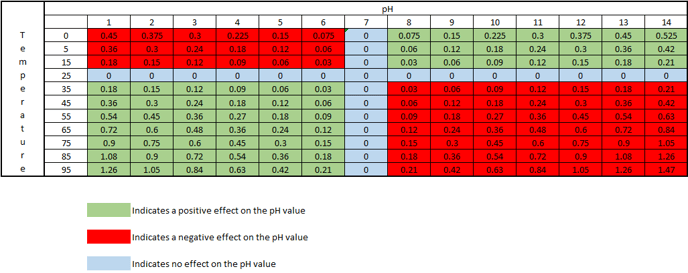
As the temperature of a solution changes, the actual pH changes. This is not an error of the probe or meter being used, but is the actual pH of the solution at that particular temperature. The temperature effect on the pH value is 0.003 pH units per oC away from 25oC, per pH units away from pH 7. This effect can be either negative or positive, depending on if the temperature is above or below 25oC, and if the pH is above or below pH 7. At 25oC and pH 7, there is no change in the pH value.
The chart below shows how the actual pH changes with temperature and pH, which allows you to correct the pH reading to 25oC. As an example, if a sample measured pH 5 at a temperature of 5oC, the chart indicates this a negative effect, therefore the sample pH would be 5 – 0.12 = 4.88pH corrected to 25oC:
MANTECH software accounts for temperature by recording the temperature during calibration via a thermistor probe, then it corrects the pH reading at the time of measurement to account for the difference in measured temperature of the sample vs. the calibration buffers. The reported pH value is the corrected value @ the sample temperature. The equation below shows how the PC-Titrate software calculates pH:
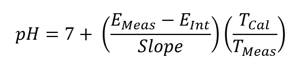
EMeas = Voltage measure by electrode at the time of titration (mV)
EInt = Voltage of the Intercept value calculated from the calibration equation. (mV)
Slope = slope of the line calculated from the calibration equation. (mV)
TMeas = temperature measured at the time of pH measurement (K degrees)
TCal = temperature taken at the time of last calibration. (K degrees)
MANTECH also offers the option to report pH values corrected to a set temperature, such as 25°C. This is implemented in the software as an additional step after the sample pH is recorded. MANTECH offers this as a feature for new MT-Series systems, or as an upgrade to existing MANTECH systems.
What is the time of analysis per parameter and for multi-parameter analysis?
The timing for analysis of different parameters depends on several different factors, like the concentration of the sample and the equipment used.
Another factor is the total available sample volume in the vessel on the AutoMax Autosampler bed. With some combinations of parameters, larger sample volume allows for simultaneous measurements, resulting in faster total analysis time than sequential measurement. A larger sample volume may require a larger sample cup, which decreases capacity on the same model Autosampler. For example, an AM401 can accommodate 112x50ml tubes, or 62x125ml cups. In some, the cases the same set of parameters can be analyzed in 2-5 minutes faster when using the 125ml cups vs 50ml tubes.
It is important to understand your requirements in terms of capacity and throughput speed, total batch capacity required and/or daily sample loads and if overnight, unattended analyses will be applicable.
Individual Parameters
| Parameter | Average Time of Analysis (Minutes) per Sample |
| pH | 1 – 3 |
| ISE by Direct Measure | 1 – 5 depending on sample concentration |
| Titrations (Alkalinity, Acidity, Hardness) | 2 – 5 depending on sample concentration, injection rates and stability control in the titration method. |
| Conductivity | 1 – 2 |
| Colour | 2 – 3 |
| Turbidity | 2 – 3 |
Combined Parameters
MT10 & MT30 Models
| Parameters | Estimated Time of Analysis (Minutes) per Sample* | |
| 50mL Tubes | 125mL Cups | |
| pH-Alkalinity | 3 – 4 | |
| Conductivity-pH-Alkalinity | 3 – 4 | |
| Conductivity-pH-Turbidity | 4 – 7 | 3 – 4 |
| Conductivity-pH-Turbidity-Colour
(only MT30 for these suit of parameters) |
6 – 9 | 3 – 5 |
MT100 Model
| Parameters | Estimated Time of Analysis (incl. TitraSip & RapidAlk) | |
| 50mL Tubes | 125mL Cups | |
| Conductivity-pH-Alkalinity | 3 – 5 | 3 – 5 |
| Conductivity-pH-Alkalinity-Fluoride | 7 – 10 with single TitraSip or 3 – 5 with RapidDuo configuration. | |
| Conductivity-pH-Alkalinity-Turbidity | 7 – 10 | 6 – 8 |
| Conductivity-pH-Alkalinity-Colour | 4 – 6 | 4 – 6 |
| Conductivity-pH-Alkalinity-Turbidity-Colour | 8 – 11 | 4 – 6 |
PC-Titrate Upgrade
What is a titration?
Titration uses a solution of known concentration to determine the concentration of an unknown solution. The titrant (the solution with a known concentration) is added from a buret to a known quantity of the analyte (the solution with an unknown concentration) until the reaction is complete. Knowing the volume of titrant added allows the concentration of the unknown solution to be determined.
Other
Support and Troubleshooting
Applications
What should I do if my titration standard is measuring too high or too low?
If your titration standards are not reading the correct concentrations, for example, the alkalinity standard reading is low, make sure the titrant has been standardized. The precision of the results can indicate if this is a mechanical or chemical problem. If the results are precise, it is likely a chemical issue. Check your standards and titrant standardization. It is also possible that the sample volume may be incorrect.
Get Smarter Solutions, Today.
Our innovative water and wastewater analyzers have faster, safer processes, with fewer hazardous reagents. Start using MANTECH solutions for more accurate data that drives responsible outcomes.